



Description
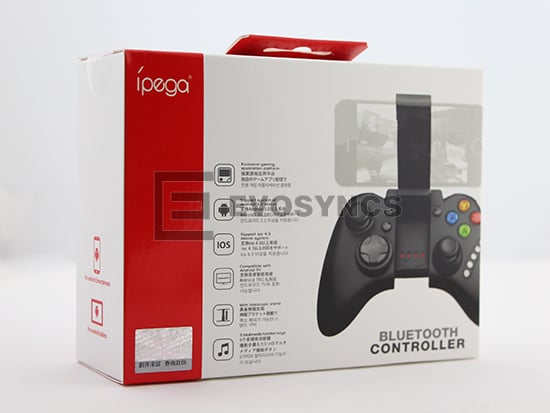
Third 3th Gen black wireless bluetooth controller for iPad iPhone and smartphone.
It is a new wireless Bluetooth controller which supports different android/ ios/ – games.
-Exclusive gaming application platform, the classic hand travel under control (ipega game lobby only for Android platform).
-With the telescopic stand, the phone can be put in the stand (maximum support for 6-inch mobile phone). Easy for playing games.
With “volume +, -,”last “,”next “”Play / Pause”, total 5 multimedia function keys (This function is imcompatible with Y key mode.)
-User-friendly software designed to enter the power saving mode with no connection state.
-Under Android system, it supports the vast majority of games and simulator games (such as MC4, Wild blood, Dungeon Hunter, Zombie, – simulator, GBA emulator, arcade emulator, SFC simulator, N64 emulator, Shadowgun, Sonic CD, Cordy, Soulcraft, Zenonia4, 9 Innings 2013, Riptide GP, etc.)
-Download method of games that are compatible: Enter itunes and App Store to search for “iCade”. The handle can be compatible with the vast majority of games, such as Gunman Clive, Helium Boy, League of Evil League of Evil 2, Muffin Knight Free Stardash, Temple the Run and so on.
-X.GamePad Mode: Only Android 3.2 + versions supports this mode.
-A.Keyboard Mode: suitable for Android system.
-B.iCade modes: suitable for IOS system.
User Manual:
X.GamePad Mode:Only Android 3.2 + versions supports this mode
when the handle turn-off, first press the “X” key, then press the HOME key, Bluetooth LED indicator flash, the handle enter into the pairing mode, turn-on the phone and search for Bluetooth devices “ipega classic gamepad” and pairing, if the pairing is successful, the LED indicator will be bright, the
handle will be in the GamePad mode.
A.Keyboard Mode:(suitable for Android system)
When the handle turn-off, first press the “A” key, then press the HOME key, the Bluetooth LED indicator flash, the handle enter into pairing mode, turn-on the phone and search for Bluetooth devices “ipega classic gamepad” and pairing, if the pairing is successful, the LED indicator will be bright, the handle will be in the keyboard mode.
B.iCade modes: (suitable for IOS system)
When the handle turn-off, first press the “B” key, then press the HOME key, the Bluetooth LED indicator flash, the handle enter into the pairing mode, turn-in the phone and search for Bluetooth devices “ipega classic gamepad” and pairing, if it is success, the LED light will be bright, the handle will be in the iCade mode.
About input method setting:
Using the controller to play game should set the phone or notebook input method to be default as English language input (For the iOS system, be sure to switch the input method, and then pairing. If not, the handle does not work properly.)
Charging controller:
When the controller is a low battery condition, the charge indicator is start blinking, please accessing the controller to 5V power supply for charging(PC device or mobile phone power adapter). Process of charging, the charge indicator of the handle is Orange and keep long bright, saturated power LED goes.
Switch on/off the controller:
Press “HOME” button for 3 seconds until the Bluetooth LED is off, it means shutdown is successful. If the phone is not unpaired connection when controller shutdown. Just do it again
Press the “HOME” button for about five seconds, until the LED red light flashes slowly. It means that the handle is turned on (the default the last boot mode), the boot handle will automatically paired with the phone connection. If the connection fails, the handle will automatically shut down.
Connect the PC:
Open the devices Bluetooth – program, and select the “X, A” in either mode can be paired with (and does not have a Bluetooth – devices need to use the Bluetooth receiver).
Note: To change the controller function mode, please turn off the controller firstly and cancel the Bluetooth pairing, then in accordance with the operation mode to replace the steps.
The Reset Switch:
When the controller cant operate normally, please use the papperclip to touch the reset switch on the left corner of the grip back when the grip cannot shut down or crash.
Packing Includes:
1xPG-9021Bluetooth Controller
1x usb Charging cable
1x English Manual
Item:
1* IPEGA PG-9021 Wireless Bluetooth V3.0 Classic Gamepad for iPhone / IPAD / Smartphone / IOS – Black


Reviews
There are no reviews yet.